Accessing Your TSC Online Payslip in 2026: The Definitive Kenyan Guide
Direct Answer: What is the TSC Online Payslip?
The Teachers Service Commission (TSC) online payslip portal is a secure digital platform enabling all registered Kenyan teachers to conveniently view, download, and print their monthly payslips and annual P9 forms.
Launched to enhance efficiency and transparency, the system provides 24/7 access to crucial salary information, streamlining financial management for educators across the nation.
Why Every Kenyan Teacher Needs Their TSC Online Payslip
In 2026, the TSC online payslip remains indispensable for every teacher. It offers unparalleled convenience and crucial financial oversight, moving beyond the limitations of physical documents.
Timely access to your payslip is vital for various financial activities and for verifying salary components.
- Loan Applications: Financial institutions frequently require recent payslips to process credit facilities.
- Tax Compliance: Your annual P9 form, essential for KRA tax returns, is readily available.
- Financial Planning: Understanding your income and deductions helps in effective budgeting and savings.
- Discrepancy Checks: It allows you to verify your salary and allowances against deductions accurately.
- Proof of Employment: Serves as an official document proving your engagement with TSC.
Types of Information Available on Your TSC Online Payslip
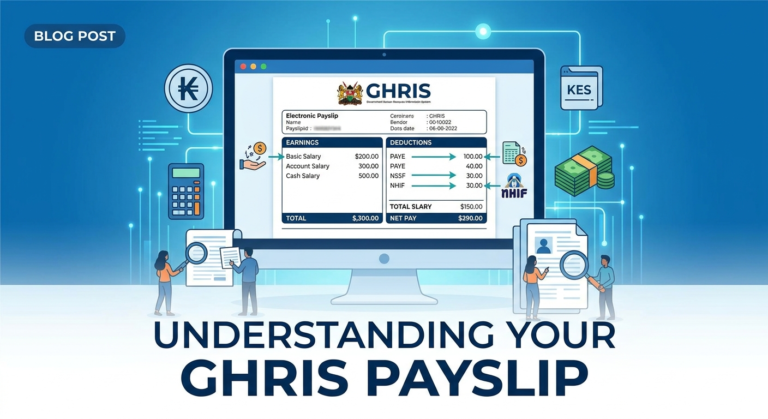
Your TSC online payslip is a comprehensive document detailing all aspects of your monthly remuneration. It meticulously breaks down your gross salary into various components, providing a clear financial overview.
Understanding each section is key to managing your finances effectively.
Key Components of Your TSC Payslip:
- Personal Details: Name, TSC Number, ID Number, Pay Point.
- Gross Salary: Your total earnings before any deductions.
- Allowances: Housing, commuter, hardship, responsibility, and other specific allowances.
- Statutory Deductions: PAYE (Pay As You Earn), NHIF (National Hospital Insurance Fund), NSSF (National Social Security Fund).
- Voluntary Deductions: SACCO contributions, bank loans, union dues, insurance premiums.
- Net Pay: The actual amount you receive after all deductions.
- Arrears: Any backdated payments owed to you.
How to Access Your TSC Online Payslip in 2026: Requirements and Steps
Accessing your tsc online payslip is a straightforward process, but it requires adherence to specific guidelines to ensure security and successful login. New teachers or those who haven’t registered will need to follow initial setup steps.
The entire process is designed for user-friendliness, aligning with Kenya’s push for digital government services.
Essential Requirements for TSC Online Payslip Access
Before you begin, ensure you have the following:
- A reliable internet connection.
- A computer or mobile device.
- Your TSC Number.
- Your National ID Number.
- A registered mobile phone number.
- An active email address.
- Your chosen password (for registered users).
Registering for Your TSC Online Payslip Account (First-Timers)
If you are a new teacher or have never accessed your payslip online, registration is your first step. This one-time process links your personal details to your online account.
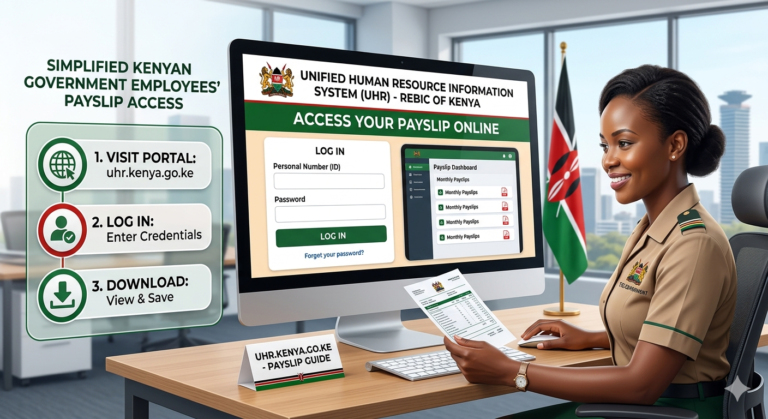
- Visit the Official Portal: Navigate to the Teachers Service Commission website. Look for the ‘Online Services’ menu and select ‘Payslips’.
- Select ‘Register’: Click on the registration option for new users.
- Enter Details: Provide your TSC Number, National ID Number, full name, KRA PIN, bank account number, and your designation.
- Set Security Questions: Choose and answer security questions. These are crucial for password recovery.
- Create Password: Choose a strong, unique password (alphanumeric with special characters).
- Confirm and Submit: Review all entered information for accuracy, then submit your registration. You will receive a confirmation message.
Logging In to the TSC Online Payslip Portal
Once registered, logging in is simple and grants immediate access to your financial records. This process remains consistent for returning users.
- Access the Portal: Go to the official TSC Payslip portal.
- Enter Credentials: Input your TSC Number as your username and your password.
- Solve CAPTCHA (if present): Complete any security verification steps.
- Click ‘Login’: You will be directed to your personal payslip dashboard.
- Navigate: From your dashboard, you can view current payslips, access archived ones, and download your P9 form.
Resetting Your TSC Online Payslip Password
Forgetting your password is a common issue. Fortunately, the TSC portal offers a secure recovery process to regain access to your account without needing to re-register.
- Go to Login Page: On the payslip login page, click on ‘Forgot Password’ or ‘Reset Password’.
- Enter TSC Number: Input your TSC Number and National ID Number for verification.
- Answer Security Questions: Accurately answer the security questions you set during registration.
- Receive OTP/Link: A One-Time Password (OTP) will be sent to your registered phone number or an email with a reset link to your registered email address.
- Create New Password: Follow the instructions to set a new, strong password.
- Login with New Password: Use your updated password to access your account.
Costs, Timelines, and Eligibility for TSC Online Payslip Access
Access to your tsc online payslip is a free service provided by the Teachers Service Commission. There are no charges associated with registration, viewing, or downloading your payslips or P9 forms.
This ensures that all registered teachers can manage their financial documents without any barrier.
Timelines: Payslips are typically updated monthly, usually by the end of the first week following the salary payment cycle. Once processed, they are immediately available on the portal.
Eligibility: Any teacher officially employed and registered with the Teachers Service Commission (TSC) is eligible to register for and access their online payslips. This includes newly employed teachers once their details are fully captured in the TSC payroll system.
Digital vs. Traditional Payslip Access: A 2026 Perspective
| Feature | Digital (Online Payslip) | Traditional (Physical Payslip – largely phased out) |
|---|---|---|
| Accessibility | 24/7 from anywhere with internet | Limited to office hours, physical distribution points |
| Speed | Instant upon portal update | Delayed by printing and distribution schedules |
| Cost | Free (excluding internet data) | Involves printing, distribution costs |
| Security | Password-protected, encrypted portal | Risk of loss, damage, or unauthorized access |
| Environmental Impact | Paperless, eco-friendly | High paper consumption |
| Archiving | Digital history readily available | Requires personal physical storage |
Common Mistakes to Avoid When Using the tsc online payslip Portal
While the tsc online payslip portal is user-friendly, certain common errors can lead to frustration or security risks. Being aware of these pitfalls can enhance your experience and protect your data.
- Using Unofficial Links: Always verify the URL to ensure it’s the genuine TSC website. Bookmark the official page to prevent misdirection.
- Sharing Login Credentials: Never share your TSC number or password with anyone, even colleagues. Your payslip contains sensitive personal and financial data.
- Ignoring Password Security: Using weak passwords or reusing old ones makes your account vulnerable. Regularly update your password.
- Not Updating Contact Information: Ensure your registered phone number and email are current. These are vital for password recovery and official communications.
- Public Computer Access: Avoid accessing your payslip on public computers or unsecured Wi-Fi networks. If unavoidable, always log out completely and clear browser history.
- Overlooking Discrepancies: Don’t just glance at your payslip. Thoroughly check all figures and report any anomalies promptly to your TSC county director or HR department.
Deep Dive: Understanding Your Kenyan TSC Payslip Deductions
A significant part of financial literacy for Kenyan teachers involves understanding the various deductions on their tsc online payslip. These deductions, both statutory and voluntary, impact your net pay but also contribute to your social security, health, and savings.
Knowing what each deduction signifies empowers you to make informed financial decisions and ensure accuracy.
| Deduction Type | Description | Purpose | Impact on Net Pay |
|---|---|---|---|
| PAYE (Pay As You Earn) | Mandatory income tax levied by KRA. Calculated based on current tax bands. | Funds government services and development projects. | Direct reduction from gross salary. |
| NHIF (National Hospital Insurance Fund) | Compulsory health insurance contribution. Amount depends on gross salary scale. | Provides medical cover for you and declared dependants. | Fixed/tiered deduction. |
| NSSF (National Social Security Fund) | Mandatory social protection scheme for retirement benefits. | Ensures a basic safety net upon retirement or disability. | Fixed monthly contribution (up to a ceiling). |
| SACCO Contributions | Voluntary savings and loan deductions through your chosen SACCO. | Facilitates savings, access to loans, and dividends. | Variable, based on individual election. |
| Bank Loan Deductions | Repayments for personal or mortgage loans from commercial banks. | Servicing outstanding debt. | Variable, based on loan agreement. |
| Union Dues | Membership fees for teacher trade unions (e.g., KNUT, KUPPET). | Supports union advocacy for teachers’ rights and welfare. | Fixed monthly fee. |
| Other Welfare Schemes | Contributions to benevolent funds, insurance schemes, etc. | Provides additional social welfare or financial protection. | Variable, based on individual enrollment. |
Future Trends in TSC Digital Services and Payslip Access (2026 Outlook)
The Teachers Service Commission is continuously enhancing its digital infrastructure to serve Kenyan teachers better. By 2026, we anticipate several advancements in how payslips are accessed and managed.
These trends aim to improve user experience, security, and integration with other government services.
- Enhanced Mobile Accessibility: Expect a dedicated, more robust mobile application with biometric login options for quick and secure access on smartphones.
- AI-Powered Support: Integration of AI chatbots for instant answers to common payslip queries, reducing reliance on manual customer service.
- Interoperability with eCitizen: Seamless integration with the broader eCitizen platform, allowing for a unified digital identity and easier cross-service authentication.
- Advanced Security Features: Continuous upgrades in cybersecurity protocols, including multi-factor authentication (MFA) as a standard, to protect sensitive data from evolving threats.
- Personalized Financial Insights: Future features might include basic analytics on spending patterns or alerts on unusual deductions.
Quick Poll: How do you prefer to access your TSC Payslip?
Your feedback helps shape future digital improvements!
- Via a dedicated mobile app.
- Through the official TSC website on a computer.
- Using mobile web browser on a smartphone.
- Other (please specify to a colleague!)
Frequently Asked Questions About the tsc online payslip
How often is the tsc online payslip updated?
Your tsc online payslip is typically updated monthly. Generally, new payslips are available on the portal within the first week of the subsequent month, following the processing of salaries.
Can I download my P9 form from the tsc online payslip portal?
Yes, absolutely. The TSC online payslip portal allows you to download your annual P9 form directly. This form is essential for filing your annual tax returns with the Kenya Revenue Authority (KRA).
What if I notice a discrepancy on my tsc online payslip?
If you identify any discrepancies, you should immediately report them. Contact your school head, TSC County Director, or the TSC headquarters HR department. Provide clear documentation of the issue and relevant payslip details.
Is it safe to access my tsc online payslip on a public computer?
It is generally not recommended to access sensitive information like your payslip on public computers or unsecured networks due to potential security risks. If you must, ensure you log out fully and clear browser history afterwards. For enhanced security, learn more here.
What if I’m a newly employed teacher and can’t access it?
Newly employed teachers may not have immediate access until their employment details are fully processed and captured in the TSC payroll system. Allow some time, usually a few weeks after official onboarding, then attempt registration. If issues persist, contact your TSC County Director.
Are there any fees associated with using the tsc online payslip portal?
No, there are no fees whatsoever. The TSC online payslip portal is a free service provided by the Teachers Service Commission to all registered teachers. You only incur standard internet data charges.
Conclusion: Mastering Your Financial Empowerment with the tsc online payslip
The tsc online payslip portal is more than just a place to view your salary; it’s a critical tool for financial empowerment for every Kenyan teacher in 2026. By understanding its features, navigating it securely, and regularly reviewing your financial data, you take control of your economic well-being.
Embrace this digital convenience to stay informed, make sound financial decisions, and contribute to a more transparent and efficient teaching profession in Kenya.