How to View Your Payslip Online in Kenya 2026: The Ultimate Guide
In 2026, accessing your payslip online in Kenya is more streamlined and secure than ever before. Whether you are a government employee under the Teachers Service Commission (TSC), Public Service Commission (PSC), or work in the private sector, understanding how to view your payslip electronically is crucial for financial planning, loan applications, and tax compliance.
This comprehensive guide will equip you with the knowledge and steps to confidently access your payslip, addressing common challenges and leveraging the latest digital platforms.
Direct Answer: Quick Steps to View Your Payslip Online
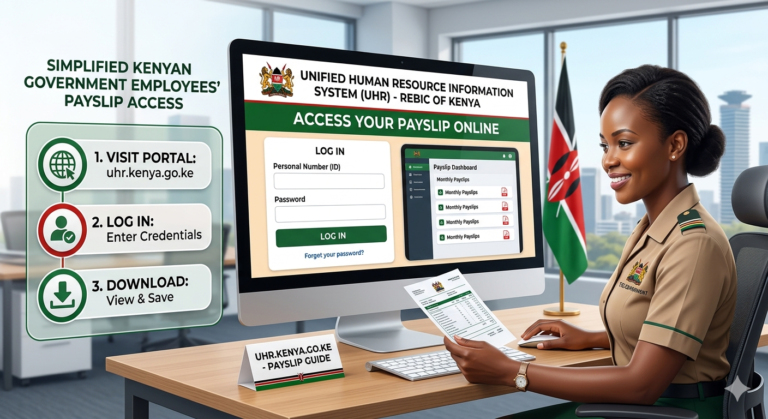
To view your payslip online in Kenya, first identify your employer’s designated portal (e.g., TSC online, your company’s HR system, or iTax for KRA). You will need your employee number, National ID, and a valid password. Navigate to the login page, enter your credentials, and select the payslip viewing or downloading option for the desired period.
Expert Tip: Always use a secure, private internet connection when accessing sensitive financial documents like your payslip. Public Wi-Fi networks can pose security risks.
What is a Payslip and Why is it Crucial for Kenyans in 2026?
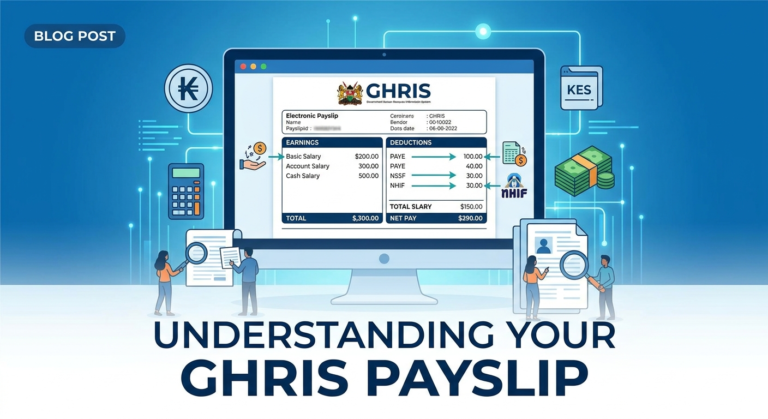
A payslip, or salary slip, is a detailed document issued by an employer to an employee, outlining earnings, deductions, and net pay for a specific pay period. In 2026, its importance extends far beyond just confirming your salary.
Beyond Just Salary: Your Financial Footprint
For Kenyans, a payslip serves as vital proof of income and employment. It is indispensable for:
- Loan and Mortgage Applications: Financial institutions in Kenya rely heavily on payslips to assess your repayment capacity.
- Tax Compliance: Your payslip details statutory deductions like PAYE, NHIF, and NSSF, which are essential for KRA tax returns.
- Budgeting and Financial Planning: Understanding your net pay and deductions helps you manage your finances effectively.
- Dispute Resolution: It provides a clear record in case of salary discrepancies or employment disputes.
- Visa Applications: Some embassies require payslips as proof of financial stability.
Types of Payslips and Common Access Methods in Kenya
Payslip access varies significantly depending on your employer type.
Government Payslips (TSC, PSC, KRA)
Government employees typically access their payslips through dedicated online portals:
- TSC Payslips: Teachers view their payslips via the official TSC online portal using their TSC number and password.
- PSC Payslips: Public servants access their payslips through the GHRIS platform or specific departmental portals.
- KRA Payslips: While KRA doesn’t issue payslips, employees can access their tax deduction statements via the iTax portal, which summarizes PAYE submitted by employers.
Private Sector HR Systems
Most private companies in Kenya, especially large and medium-sized enterprises, have adopted integrated Human Resources Information Systems (HRIS). These systems often include self-service portals where employees can log in to view and download their payslips securely.
How to Safely View Payslip Online: A Step-by-Step Guide for Kenyans
Regardless of your employer, the general process to view your payslip online in 2026 follows a similar pattern.
General Steps for Most Platforms
- Identify Your Portal: Confirm the exact URL or system your employer uses for payslip access.
- Gather Credentials: Ensure you have your employee ID/number, National ID, and password readily available.
- Access the Portal: Open your web browser and navigate to the official portal URL.
- Log In Securely: Enter your login details. If it’s your first time or you’ve forgotten your password, follow the ‘forgot password’ or ‘first-time user’ prompts.
- Navigate to Payslips: Once logged in, look for sections like ‘My Payslips,’ ‘Salary Information,’ or ‘Payroll.’
- Select Period and View/Download: Choose the specific month or year for which you wish to view the payslip. Most platforms allow you to view directly or download as a PDF.
Specifics for TSC Payslip Login 2026
- Visit the official TSC website (www.tsc.go.ke).
- Click on ‘Online Services’ then ‘Payslip.’
- Enter your TSC number, National ID number, and password.
- Click ‘Login.’
- From the dashboard, you can select ‘View Payslips’ to access current and past payslips.
Accessing KRA Payslips (Tax Deduction Statements)
- Go to the KRA iTax portal (itax.kra.go.ke).
- Log in with your KRA PIN and password.
- Navigate to ‘Returns’ > ‘File Return’ > ‘Individual.’
- Select ‘PAYE’ and the relevant year to generate your income tax return, which includes a summary of your PAYE contributions as reported by your employer.
Requirements and Timelines for Payslip Access
Accessing your payslip typically requires minimal documentation but adherence to employer timelines.
What You’ll Need
- Employee/Service Number: Unique identifier provided by your employer.
- National ID Number: For verification purposes.
- Password: Your unique login credential for the portal.
- Internet Connection: Stable and secure for online access.
Understanding Payslip Generation Cycles
Most employers generate payslips monthly, typically within the first week of the new month for the preceding pay period. For example, your January 2026 payslip will usually be available by the first week of February 2026. Be aware of your company’s specific payroll cycle.
Common Mistakes When Trying to View Payslip and How to Avoid Them
Navigating online portals can sometimes lead to minor frustrations. Here are common pitfalls and solutions:
- Incorrect Credentials: Double-check your employee ID, National ID, and password. Ensure caps lock is off if not part of your password.
- Using Outdated Browsers: Ensure your web browser is updated to the latest version for optimal compatibility and security.
- Ignoring Password Reset Options: If you forget your password, promptly use the ‘Forgot Password’ or ‘Reset Password’ link provided on the login page.
- Phishing Scams: Always verify the URL is legitimate before entering your details. Be wary of suspicious emails or messages asking for your login information.
Warning: Never share your payslip portal login credentials with anyone, even if they claim to be from HR or IT support. Official personnel will never ask for your password.
Expert Tips for Secure Payslip Management in Kenya
Managing your payslips securely in 2026 is critical. Here’s a checklist to ensure your financial data remains private and protected.
Your Payslip Security Checklist (2026 Edition)
- Use Strong, Unique Passwords: Combine uppercase, lowercase, numbers, and symbols. Avoid easily guessable information.
- Enable Two-Factor Authentication (2FA): If your employer’s portal offers 2FA, activate it immediately for an extra layer of security.
- Download to Secure Devices Only: Only download payslips to your personal, password-protected computer or smartphone.
- Store Safely: If you download, keep PDF copies in a secure, encrypted folder on your device or a trusted cloud service.
- Regularly Review Your Payslip: Check for any unauthorized deductions or discrepancies. Report issues to HR promptly.
- Be Wary of Phishing: Always confirm the sender’s legitimacy before clicking links in emails related to your payslip.
learn more
For further insights into managing your digital financial records, including payslips, you can learn more about comprehensive HR and payroll solutions.
The Future of Payslips in Kenya: 2026 and Beyond
The digital transformation of payslips is set to continue evolving. In 2026, we are already seeing enhanced security features, better integration with financial apps, and even AI-driven insights into earnings and deductions. Expect more seamless access, potentially via secure mobile apps, and deeper integration with personal financial management tools, making it even easier for Kenyans to manage their money.
Frequently Asked Questions About Viewing Payslips in Kenya
- How can I get my payslip if I’ve left my previous employment in Kenya?
-
Most former employers are legally obligated to provide you with access to your past payslips for a certain period. Contact your former HR department or payroll administrator. They may provide a login to their portal or send PDF copies via secure email.
- Is it safe to download my payslip to my phone?
-
Yes, if your phone is password-protected, has up-to-date security software, and you download from official portals. Always be mindful of where you save the file and consider deleting it after use if storage is not secure.
- What if my employer refuses to provide a payslip?
-
In Kenya, employers are generally required to provide payslips. If your employer refuses, you can seek advice from the Ministry of Labour or consult with a labor law expert. This is a crucial document for your rights and obligations.
- Can I use my payslip to apply for a CRB clearance certificate?
-
While a payslip doesn’t directly grant a CRB clearance certificate, it is a key document that financial institutions use to assess your creditworthiness for loans. Having regular, verifiable income (proven by payslips) is fundamental to building a positive credit history, which in turn facilitates CRB clearance.
- Are there any charges for viewing payslips online?
-
No, there should be no direct charges to employees for viewing or downloading their payslips from official employer portals. If any platform asks for payment to access your payslip, it is likely a scam.
Conclusion: Empowering Kenyans to View Payslip with Confidence
In 2026, viewing your payslip online in Kenya is an essential aspect of personal financial management. By understanding the different access methods, adhering to security best practices, and leveraging the available digital tools, you can ensure seamless and secure access to your vital income information. This empowerment not only simplifies your financial life but also strengthens your position for various financial opportunities, from securing a loan to filing your annual tax returns.
Sources:
- Kenya Revenue Authority (KRA) – Official Tax Information.
- Teachers Service Commission (TSC) – Official Portal for Teachers.
- Kenya National Bureau of Statistics (KNBS) – Economic and Employment Data.
- Central Bank of Kenya (CBK) – Financial Sector Oversight.